Building an Analytics Codegen Pipeline
by Aaron Orozco
In our iOS project, adding or changing an analytics event meant finding its tracking calls, checking the properties, and updating what we sent to each provider.
The same event could have a different name in Amplitude than in Firebase, with different property names as well. We maintained those mappings by hand, so even a small change meant checking several places to keep them consistent.
The repetitive work was turning an event definition into Swift code and provider-specific payloads. Once the event and its mappings were defined, that translation followed predictable rules. It was a good fit for code generation.
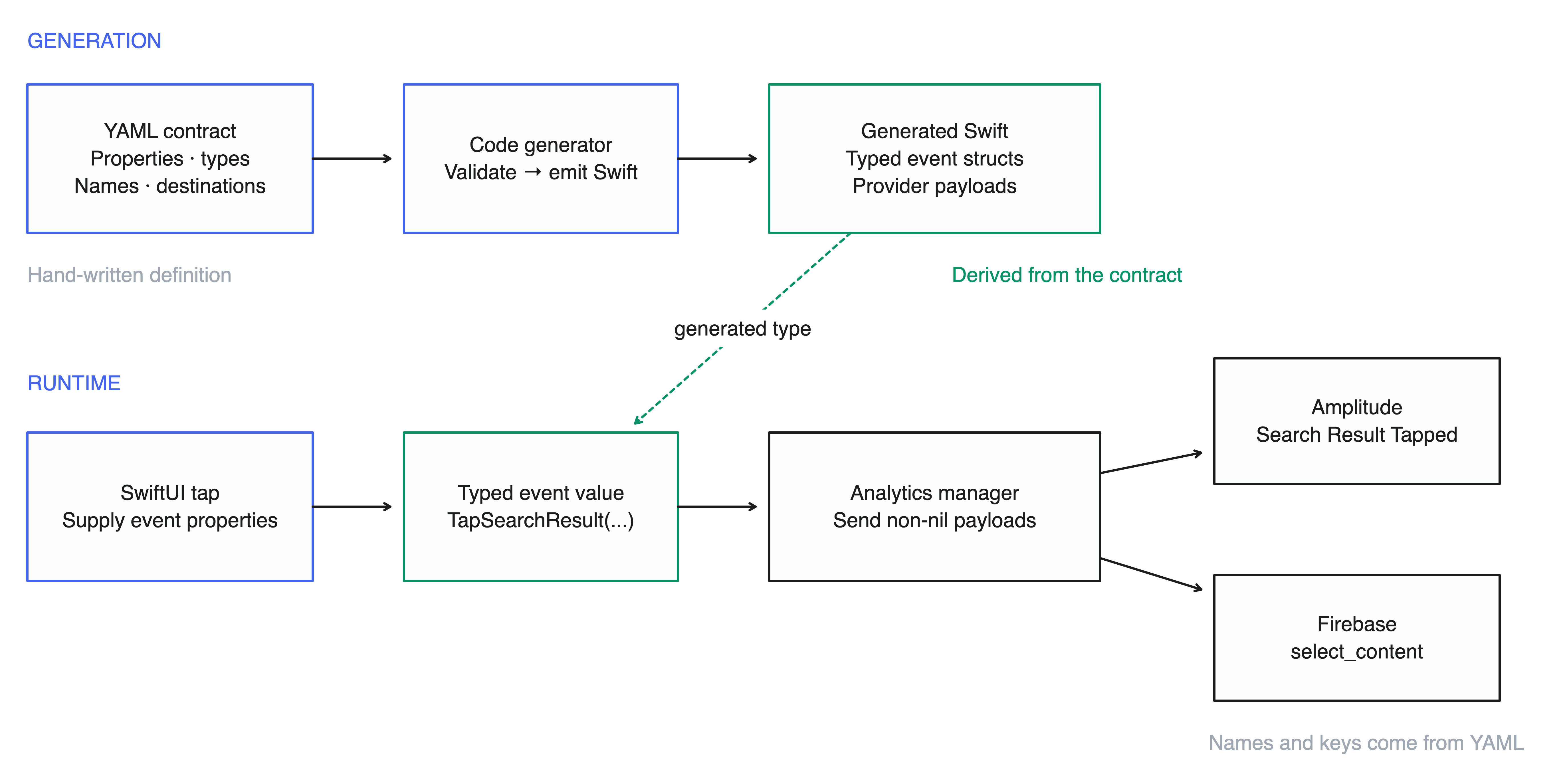
I built a pipeline that defines each event once in YAML and generates the typed Swift struct and provider payloads from it. App code supplies the event’s properties; the generated code handles the names and keys each destination expects.
The architecture
- YAML files define the events, their properties, and their destinations.
- The generator turns those definitions into Swift structs and provider-specific payloads.
- App code creates an event and passes it to the analytics manager.
- The manager sends each payload to its provider.
The event structs and provider mappings come from YAML. Tracking calls stay in app code, where the values are available.
Defining events in YAML
Events are grouped into YAML files by domain, such as Search, Onboarding, or Settings. This example defines a tap on a search result:
domain: Search

events:
  TapSearchResult:
    description: User taps a result from the search results list.

    properties:
      query:
        type: string
      resultId:
        type: string
      resultType:
        type: string
      position:
        type: int

    providers:
      amplitude:
        eventName: "Search Result Tapped"
      firebase:
        eventName: "select_content"
        propertyNames:
          resultId: "item_id"
          resultType: "content_type"
The properties block defines what app code supplies when it tracks the event. Here, that includes the query, the selected result, and its position in the list.
The providers block defines how that event is sent to each destination. The same tap becomes “Search Result Tapped” in Amplitude and select_content in Firebase.
Property names can differ too. App code uses resultId and resultType; the Firebase payload uses item_id and content_type, matching the parameters expected for select_content.
Swift Generation
Each event becomes a Swift struct under its domain namespace. The properties use Swift types, and the provider mappings become computed properties:
extension SearchEvent {
    struct TapSearchResult: AnalyticsEvent {
        let query: String
        let resultId: String
        let resultType: String
        let position: Int

        var amplitude: ProviderEvent? {
            ProviderEvent(name: "Search Result Tapped", properties: [
                "query": query,
                "result_id": resultId,
                "result_type": resultType,
                "position": position
            ])
        }

        var firebase: ProviderEvent? {
            ProviderEvent(name: "select_content", properties: [
                "query": query,
                "item_id": resultId,
                "content_type": resultType,
                "position": position
            ])
        }
    }
}
Each computed property builds the payload for one provider, using its event name and property keys. ProviderEvent holds that name and the properties to send:
struct ProviderEvent {
    let name: String
    let properties: [String: Any]
}
The analytics manager accepts any type that conforms to AnalyticsEvent. The protocol has an optional payload for each provider, with a default of nil:
protocol AnalyticsEvent {
    var amplitude: ProviderEvent? { get }
    var firebase: ProviderEvent? { get }
}

extension AnalyticsEvent {
    var amplitude: ProviderEvent? { nil }
    var firebase: ProviderEvent? { nil }
}
An event only implements the providers listed in its YAML definition. For any other provider, the default returns nil.
The manager checks those payloads and sends the ones that exist. It doesn’t need a switch over event types or a separate routing table:
func track(_ event: AnalyticsEvent) {
    if let amplitude = event.amplitude { amplitudeClient.track(amplitude) }
    if let firebase = event.firebase { firebaseClient.track(firebase) }
}
Running the generator
Run make analytics after changing an event definition. The generator first validates the YAML against the schema, then writes the Swift files.
The same YAML produces the same Swift. The generator also has unit tests that verify its output compiles.
We commit the generated Swift alongside the YAML, so a PR shows both the definition change and its output. Review focuses on the event definition and provider mappings in YAML. The generated diff shows how those changes carry through to Swift.
Tracking an event in SwiftUI
A search result row can track TapSearchResult in its button action, using the query and result details already available to the view:
Button(result.title) {
    analytics.track(
        SearchEvent.TapSearchResult(
            query: searchText,
            resultId: result.id,
            resultType: result.type,
            position: index
        )
    )
    openResult(result)
}
Typing SearchEvent. lists the events in that domain through autocomplete. The initializer shows the required properties, and the compiler checks their Swift types.
The view supplies one event. The manager sends its generated payloads to Amplitude and Firebase, with the names and property keys defined in YAML.
Adding an event now means defining its properties and provider mappings in YAML, generating the Swift, and calling it where the action happens. The call site stays typed, and the provider-specific names and keys are maintained in one place.